
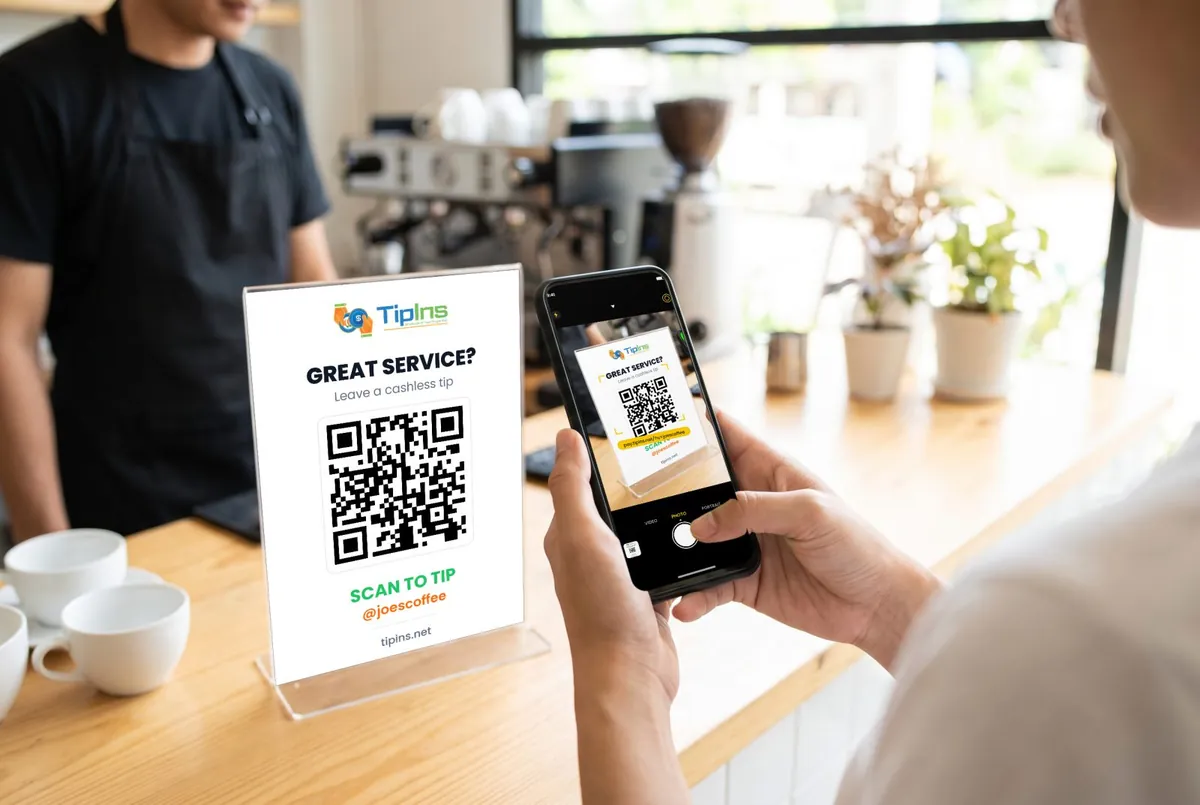
Short answer: the method that works for the most customers is a QR code that opens a card payment page: anyone can tip from their phone camera with a card, Apple Pay or Google Pay, and they need no app. Payment apps such as Venmo and Cash App work only when the customer has the same app. A card reader works if you stand at a counter, and the tip line on the venue's card machine works if your employer passes card tips on to you.
The options side by side
| Method | What the customer needs | What it costs you | Tips for a team |
|---|---|---|---|
| QR code tip page (TipIns) | A phone camera and a card, Apple Pay or Google Pay | No monthly fee. 10% plus card processing per tip, added on top for the customer by default | Yes: one code, split automatically |
| Venmo | A Venmo account and the app (US only) | Business profile 1.9% + $0.10 per payment | No |
| Cash App | A Cash App account (US only) | Business account 2.6% + $0.15 per payment | No |
| PayPal | The PayPal app, by PayPal's own help pages | Business QR code payments 2.29% + $0.09 | No |
| Zelle | A US bank account at a participating bank and its app | Usually free; depends on your bank | No |
| Card reader (for example Square) | A card or phone wallet, at your device | In person 2.6% + 15 cents on Square's free plan | Tip pooling on paid plans |
| Tip line on the venue's card machine | A card, at the till | Depends on your employer and your state | Through the employer's pool |
Fees for other companies are their US rates from their own pages, checked in October 2026. Each one is linked under Sources.
1. A QR code tip page
You show a code on your phone, a badge or a printed sign. The customer points their camera at it, a payment page opens in the browser with your name on it, and they choose an amount and pay with a card, Apple Pay or Google Pay. Nothing to install, no account, and it works with any customer's phone.
With TipIns the code and the page are free. Each tip carries a 10% platform fee plus card processing (2.9% + $0.30 in the US), and by default the customer pays both on top, so you receive the full tip they chose. Tips are paid to your bank every Friday for free, or instantly for 2% + $0.25. How it works in detail: QR code tipping explained.
2. Venmo, Cash App and PayPal
Many workers share a handle or show the app's own QR code. It costs little, but only customers with the same app can use it, which rules out visitors, older customers and anyone with a different app. There is also a rules problem: Venmo's user agreement says personal accounts may not be used for business transactions, Cash App's terms say a personal balance is for personal, non-commercial use, and PayPal's says you must not send a personal payment to pay for goods or services. Taking work income regularly on a personal account can get it limited. Business profiles avoid that, at the fees above. More in Venmo for tips: limits and alternatives.
3. Zelle
Zelle moves money between US bank accounts and usually costs nothing. The customer needs an account at a participating bank and has to type your phone number or email into their banking app, which is slow at a table or a kerb. There is no card, Apple Pay or Google Pay option and no purchase protection.
4. A card reader or tap-to-pay app
A reader from Square or a similar company takes cards and phone wallets in person, with a tip prompt. It suits a stall, a chair or a counter where you take payment anyway. It is less useful when the tip moment is away from a till: at a car door, a hotel room or the end of a tour. Square's tip pooling needs a paid plan.
5. The tip line on the venue's card machine
In restaurants and bars most card tips arrive this way. You do not choose the system: the employer collects the tips, may pool them, and pays them with your wages. Federal law says employers and managers may not keep any part of employees' tips. Whether card fees can come out of your tips depends on the state; see tipped minimum wage by state.
What to look for
- The customer needs nothing. Every extra step loses tips: an app to download, an account, a username to type.
- Your name on the payment page. The customer should see who they are tipping before they pay.
- The money reaches your bank. Check how often payouts run and what fast payouts cost.
- Teams. If tips are shared, one code that splits each tip saves counting at the end of the shift. See how to split tips between employees.
- A record. Tips are taxable income, card or cash. A list of every tip with its date makes reporting easier, and the no tax on tips calculator shows what the federal deduction saves.
Make sure customers see it
Put the code where the tip happens: on a lanyard, a badge, the valet ticket, the counter or the tip jar. Say one short line at the end of the service, such as "If you are not carrying cash, the code is right here." Ideas for each job are in QR code tip jars by job, and the tip sign generator prints a sign for free.
Sources
- Venmo: Our fees
- Venmo for Business (business profiles)
- Venmo help: QR codes for Business Profiles
- Venmo help: Can I use Venmo to buy or sell goods or services?
- Venmo Purchase Protection
- Venmo US User Agreement
- Cash App: Send money
- Cash App help: Cash App for Business fees
- Cash App help: Supported business types and features
- Cash App help: Create a Cash App Business account
- Cash App Terms of Service (US)
- PayPal Merchant Fees (US)
- PayPal Consumer Fees (US)
- PayPal QR Codes for Business
- PayPal help: friends and family vs goods and services
- PayPal help: friends and family payments to business accounts
- Zelle FAQ
- Zelle FAQ: Using Zelle
- Zelle FAQ: How do I use a Zelle QR code?
- Zelle: How do I access Zelle?
- Zelle Security
- Square US: Understanding our fees
- Square help: Learn about Square fees
- Square Payment Links (US)
- Square help: Create and share payment links
- Square help: Set up and edit transfer options
- Square help: Get started with tip pooling
Checked in October 2026; Apple Cash on 13 November 2026. Fees and terms change, so check the company's own pages before you decide. This is general information, not tax or legal advice.
Common questions
What is the easiest way to accept tips without cash?
A QR code that opens a card payment page. The customer scans it with their phone camera and tips by card, Apple Pay or Google Pay, with no app or account.
Can I use my personal Venmo or Cash App for tips?
Their terms say personal accounts are for personal payments, not business. Regular work income on a personal account can get it limited. A business profile or a tip page built for tips avoids that.
Do customers need an app to tip me by QR code?
Not with a card payment page such as TipIns. With a Venmo, Cash App or PayPal code they need that app.
Are card tips taxed?
Tips are taxable income whether they come in cash or by card, and must be reported. A federal deduction for qualified tips applies for the 2025 to 2028 tax years, within limits.

 App Store
 Google Play
